
If you are still copying line items into a template, emailing PDFs, and chasing people who "forgot" to pay, invoice automation is the upgrade you have been putting off. It replaces the manual billing grind with software that generates, sends, tracks, and reconciles invoices for you. No spreadsheet. No 2am "did they pay yet?" check.
For anyone selling software, subscriptions, or digital products, manual invoicing does not just waste hours. It leaks revenue. Invoices go out late, follow-ups never happen, taxes get calculated wrong, and cash sits uncollected because nobody had time to send a reminder. Invoice automation fixes the boring parts so you can spend your time building instead of billing.
This guide covers what invoice automation actually does, the pieces worth automating, the tools that do it, and where a merchant of record removes the whole job instead of just speeding it up.
TLDR
Start where billing gets stuck: creating and sending invoices, or collecting money after an invoice or renewal fails.
- Automate invoice creation first if admin delays billing. Creation, delivery, and tracking replace copied line items, emailed PDFs, and manual payment-status checks.
- Prioritize recovery if payments stall. Overdue invoices, expired cards, and authentication failures need different responses. Reminders cannot resolve disputes or a customer’s inability to pay.
- Choose an invoicing tool when you bill named clients and need to chase what they owe.
- Choose accounting software when each paid invoice should land in your books without entering the same details again.
- Look at approval-workflow platforms if someone needs to sign off before you pay vendors. That is accounts payable, a separate job from billing customers.
- For software sellers billing buyers worldwide, the biggest win is to stop issuing the invoices yourself. A merchant of record such as Creem becomes the legal seller, then files and remits VAT and sales tax on the sales it makes for you.
Ordinary invoicing and accounting tools leave VAT and sales tax with you. Your business’s income taxes and bookkeeping remain yours.
What does invoice automation actually do?
Customer invoice automation tools cover different parts of billing. Depending on the platform, they can take your billing data, create an invoice, send it, track whether it gets paid, and record the payment in your books. A subscription renewal can follow that path without someone rebuilding the invoice each month.
The distinction is which direction the money travels:
- Accounts receivable covers customer billing. With automated reconciliation, the payment gets tied to the right invoice and recorded, so nobody has to reconcile it by hand.
- Accounts payable covers supplier bills. Software captures incoming invoices, checks them against purchase orders, routes them for approval, and prepares outgoing payments.
The renewal invoice you send a buyer is receivable. The hosting bill you receive is payable. If a tool’s pitch focuses on capturing and approving incoming bills, it describes an accounts payable workflow for bills you owe.
An invoice marked “sent” stays open until the money arrives and is matched to it. Tracking and reconciliation close that loop, so an automatically generated PDF alone does not finish the job.
Check which customer-billing jobs a tool actually handles: create, send, track, and match. Coverage varies by platform.
Which billing tasks are worth automating first?
If retyping and invoice errors delay billing, start with creation. If invoices sit unpaid or renewals fail overnight, start with collection. Check invoice details and paid/unpaid status first, or automated reminders will chase the wrong people.
Invoice creation, delivery, and tracking
Saved templates stop you copying a client’s address and the same line items into a fresh document each month. Scheduled recurring invoices remove the manual sending too.
A missing purchase-order reference or an invoice sent to the wrong person can still delay payment. Add the required reference and billing recipient to the client’s saved details before turning on scheduled sending.
Payment collection and dunning
Scheduled reminders replace manual chasing of valid, undisputed unpaid invoices, though they cannot fix a dispute or a client’s inability to pay.
Dunning handles what happens after a renewal charge fails: the system retries or asks the buyer to fix the problem.
- Insufficient funds may call for a later retry.
- An expired card needs updated payment details.
- An authentication requirement needs the buyer to complete authentication.
Choose a system that lets buyers update an expired card themselves instead of emailing you. Disputed invoices still need a person, because no retry or reminder settles a disagreement.
Tax calculation and reconciliation
Invoice tax depends on what you sell and where the buyer is, supported by evidence such as their billing country. Adding that amount does not submit a tax return.
Reconciliation explains how the invoiced total becomes the cash received after adjustments such as refunds and fees. Automate that matching if you keep manually tracing the difference between invoices and bank deposits.
How we chose the invoice automation tools below
Whose name appears as the seller on the buyer’s invoice, and who files VAT and sales tax on that sale, sorts these tools first. If both answers are “you,” the tax work stays with your business, however good the invoices are. Some tools help you run billing. Others take on the sale itself.
Billing fit comes next. A tool built for one-off client invoices can still leave your monthly renewals or metered usage needing a second system.
The cost comparison includes the whole operation:
- Monthly software charges.
- Per-sale payment fees.
- Extra tools you pay for when the base product cannot handle subscriptions or usage.
- Integration work to connect and maintain the stack.
- Tax administration that stays with your business.
A monthly software price and a per-sale fee cover different jobs. Compare what each option handles, then add up what remains: tax administration, hours of integration upkeep, and any second tool needed for renewals. With gateways for international payments, unsupported settlement currencies can add a conversion fee to the cost of each sale.
Invoice automation tools worth knowing
For a business client, you send an invoice and follow up until it is paid. For a subscriber, the card is charged on renewal, and the receipt still needs the right tax line.
Invoicing, accounting, and approval-workflow tools make those tasks easier while you remain the seller. A merchant of record takes on the legal seller role, issues the buyer’s invoice, and handles transaction taxes on the sales it makes for you. That is the dividing line between running billing with better tools and handing off customer billing. If you invoice a handful of business clients, an accounting tool is fine. If you sell software or digital products to customers around the world, the more useful question is whether you should be issuing invoices yourself at all.
Stripe Invoicing
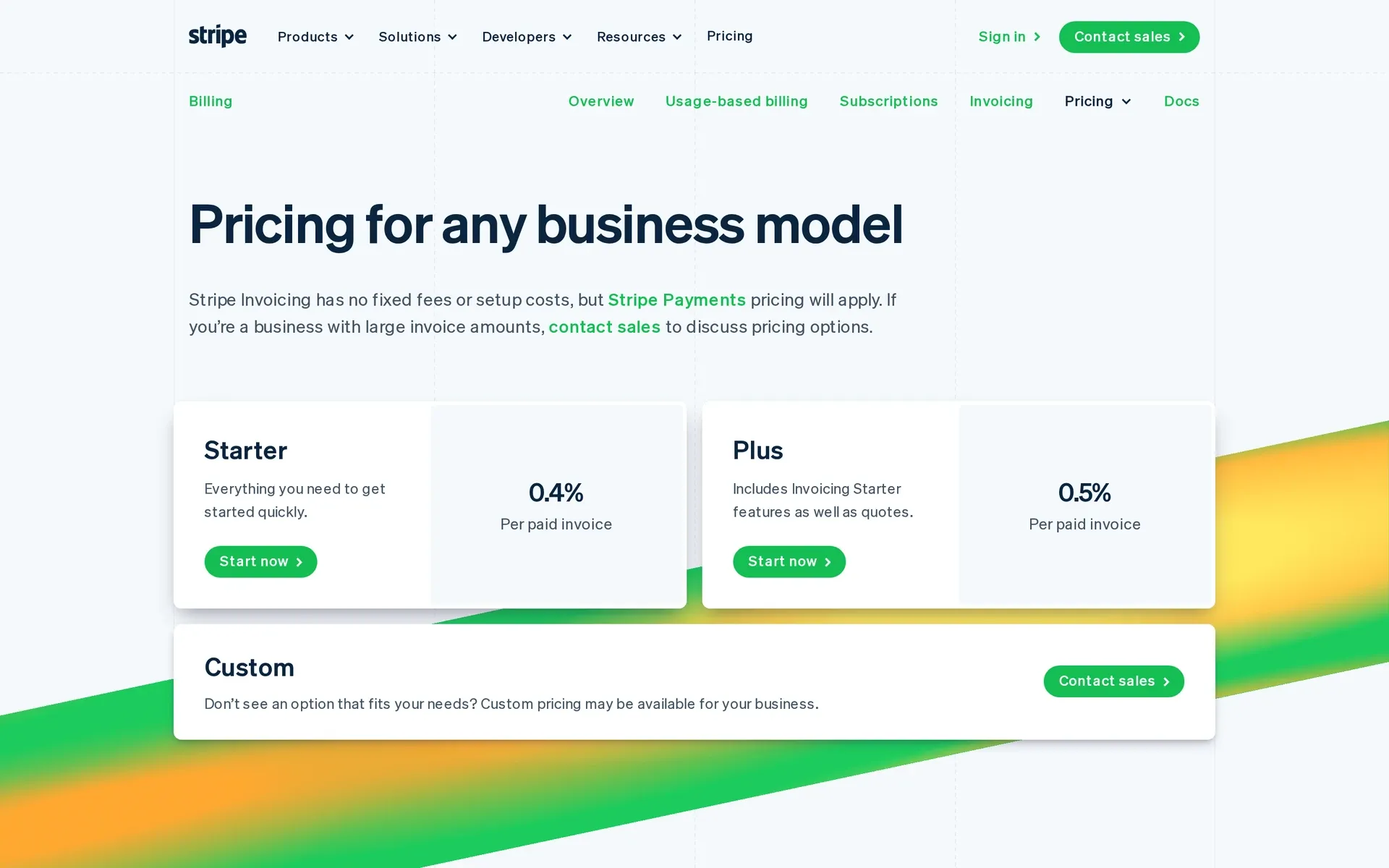
Stripe Invoicing suits developers and startups already charging cards on Stripe, though you stay the seller, so tax registration, filing and chargeback responsibility stay with you. Stripe’s separate merchant-of-record option, Managed Payments, covers only a limited set of transactions. Its invoicing tools save a second tool for collections, though retries depend on payment methods and settings.
Starter and Plus both include:
- Smart Retries for failed payments.
- Automatic email reminders.
- Payment matching to the right invoice when clients pay by ACH credit or bank transfer.
Starter charges 0.4% per paid one-time invoice, plus payment processing. Plus charges 0.5% and adds quotes. Both fees sit on top of payment processing: a $100 invoice adds $0.40 or $0.50 before processing fees. Neither has fixed or setup fees.
Automatic invoices after Checkout or Payment Links purchases cost 0.4% of the total, capped at US$2 per invoice. That cap does not apply to standalone invoices.
After an issuer hard decline, Stripe stops retries until the buyer adds a new payment method. India-issued cards are not retried, and local payment methods need separate retry settings.
QuickBooks and Xero
Your accounting tool can handle recurring client invoices alongside your books. QuickBooks templates cover other transactions too. Xero combines invoices, supplier bills, and bank reconciliation.
In QuickBooks, Scheduled templates record transactions automatically, Reminder templates prompt you, and Unscheduled templates wait for manual use. Recurring does not always mean hands-off.
Both tools send automatic invoice reminders. To collect automatically in QuickBooks, you need QuickBooks Payments, and your client must enroll in Autopay through an invoice and enter payment details. Xero repeating invoices can offer online payment options. Those options alone do not automatically charge the buyer.
Xero Early and Ignite cap customer invoices at 20. Connected-app transactions can count toward US Early’s allowance.
- US Early costs $27 monthly before applicable taxes, plus $5 for auto-reconciliation. Multi-currency requires Established at $97 monthly.
- UK Ignite costs £18 monthly excluding VAT, plus £3.50 for auto-reconciliation. Multi-currency starts with Comprehensive at £55 monthly.
Online invoice payments carry separate fees. Before relying on recurring invoices, confirm whether each client has authorized automatic collection or still needs to pay.
Both suit sellers whose priority is clean books and who send a moderate number of invoices to named clients. Reconciliation is strong, but both are lighter on high-volume digital subscriptions.
Bill.com
Do you need to approve bills you owe, or only collect what clients owe you? Bill.com’s current BILL Accounts Payable & Receivable handles both.
BILL sends reminders and tracks who has paid. Clients pay by ACH or card, and payments can be set to go through automatically.
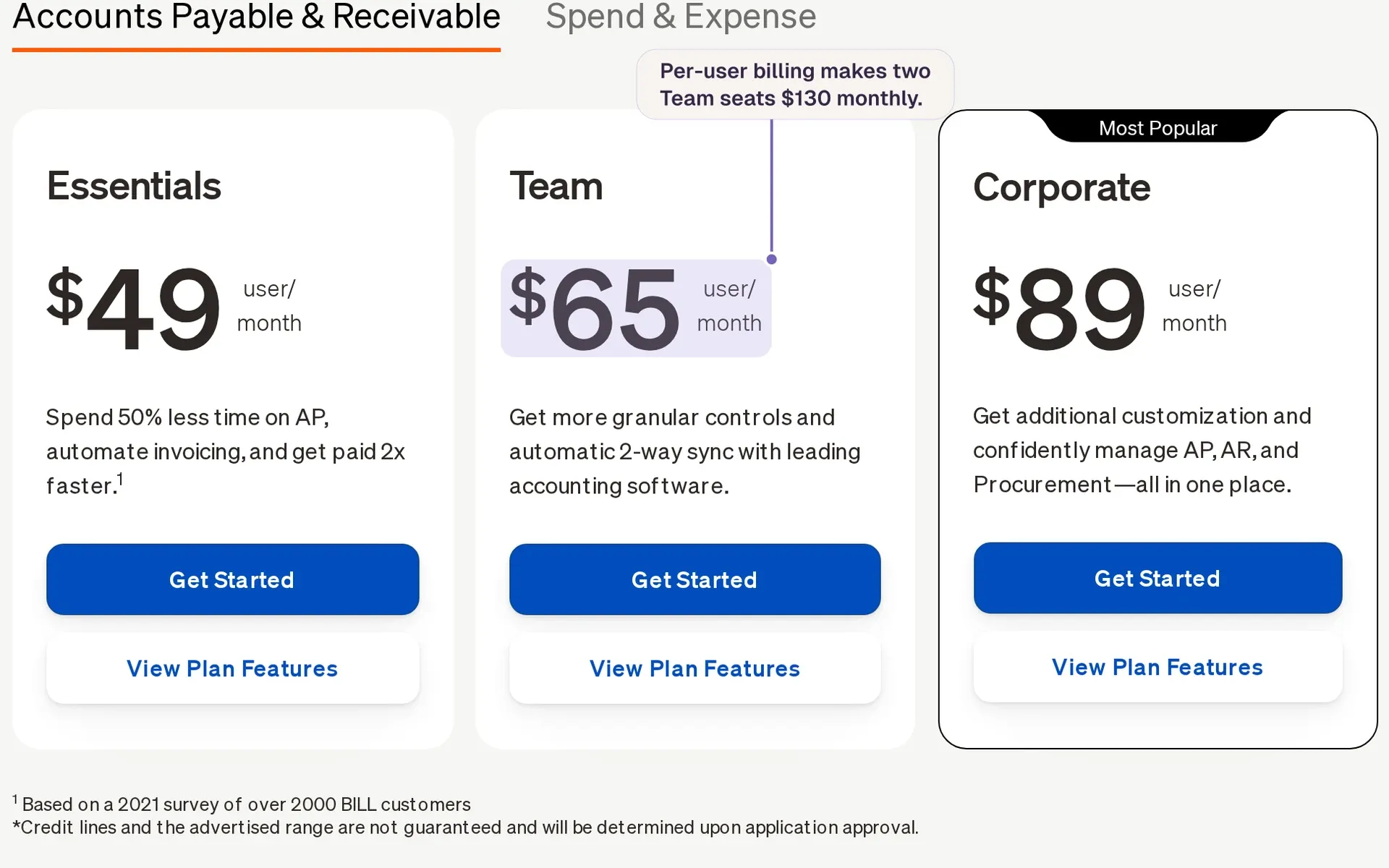
Pricing depends on the workflows you need:
- Essentials costs $49 per user monthly, with standard supplier-bill approvals and manual CSV accounting exchange.
- Team costs $65 per user monthly, adding QuickBooks Online and Xero sync. QuickBooks Enterprise sync requires BILL’s quoted Enterprise plan.
- Corporate costs $89 per user monthly and adds custom approval policies.
Two people on Team pay $130 monthly before collection fees. Customer ACH collection adds $0.59 per payment. Card collection costs 2.9%.
If you sell software through checkout and have no supplier bills to route for sign-off, you would pay per user for workflows you never open. BILL earns its place when client collections and supplier approvals both need attention.
A Merchant of Record like Creem
Creem takes on the legal seller role that invoicing and accounting tools leave with you, so we issue the buyer’s invoice and handle transaction-tax remittance. We calculate, collect, and remit VAT, GST, and sales tax for buyers in 190+ countries. Fraud screening and chargeback liability sit with us too.

When a subscription renews, we charge the buyer’s card, run failed-payment recovery if the charge fails, and issue the invoice with its VAT or sales tax line. Nothing waits in a template for you to fill. Usage meters, prepaid credits with auto-refill, and hosted or embedded checkout on your own domain in 42 languages come built in, and buyers find their invoices in the customer portal.
Uneed moved its payments to Creem in minutes, changing 1,500+ lines of payment code with three AI prompts and zero integration errors.
Creem’s pricing puts that work under one fee, which you can set against stacking an invoicing tool, a tax engine and filing work. The standard commercial terms are:
- 3.9% + $0.40 per successful transaction, including tax, invoicing, compliance, and dispute handling.
- No monthly fee, setup fee, or minimum volume.
Set that fee against what your invoicing tool, tax engine and filing hours cost you each month. If Creem comes out ahead, try Creem and cancel the invoicing tool once the first invoices come from us.
Invoice automation tools compared
Only one row changes who sells to the buyer, so the legal-seller and tax columns decide most of this comparison.
| Tool | Billing workflow | Legal seller | Who handles transaction-tax duties? | Price |
|---|---|---|---|---|
| Stripe Invoicing | Customer invoices, reminders, and payment retries | Your business (Managed Payments covers a limited set of transactions with Stripe as seller) | You handle registration, filing, and remittance where required | 0.4% or 0.5% per paid one-time invoice, plus processing |
| QuickBooks and Xero | Customer invoicing alongside your accounting records | Your business | You handle registration, filing, and remittance where required | Xero US starts at $27 monthly before applicable taxes, plus customer-payment fees |
| Bill.com | Customer collections and supplier-bill approvals | Your business | You handle registration, filing, and remittance where required | From $49 per user monthly, plus ACH collection fees or 2.9% for cards |
| Creem | Checkout invoices, subscriptions, metered billing, and prepaid credits | Creem | Creem calculates, collects, and remits VAT, GST, and sales tax | 3.9% + 40¢ per successful sale, covering tax, invoicing and chargebacks, with no monthly or setup fee |
Where invoice automation stops: tax and compliance
A correct tax line on an invoice does not change who legally sells to the buyer or who owes the tax. Your invoice might show VAT charged to a buyer abroad, while your business still has to complete any required registration, file the return, and pay that VAT over.
An automatically delivered download and the same download bundled with live instruction or consulting raise different classification questions. In the UK, VAT guidance distinguishes automatically delivered digital content from services involving human intervention. A template can apply a rate consistently even when the product’s classification is wrong.
Before adding a call or coaching session to a download, check whether the bundle still counts as a digital product where your buyers are.
Invoice format is another check. Where structured invoicing or transaction reporting is required, the tax authority expects invoice data in a specified format or reported directly, so a PDF in the buyer’s inbox is not the whole job.
Put these questions to any billing provider:
- How is my product classified?
- What invoice format and transaction reporting are required?
- Whose name appears on the sale as seller?
The first two establish what your billing system needs to produce. The third establishes who carries the seller’s responsibilities, and that answer changes only when someone else takes on the sale. That seller-liability gap is exactly what the merchant-of-record model exists to close.
The bigger move: let a Merchant of Record bill for you
When the merchant of record contract makes it the reseller, the buyer’s invoice carries its name because it is selling the product to them. You still ship what they bought.
Billing that fits how you charge
Handing off the sale tells you nothing about whether the provider can bill the way your product works. Support for monthly plans does not establish support for token meters or credit wallets.
Prepaid credits collect cash before the compute is spent. If you charge for metered usage afterward, a failed payment means you have already paid for the compute. Auto-refill lets the credit wallet top itself up before it runs dry.
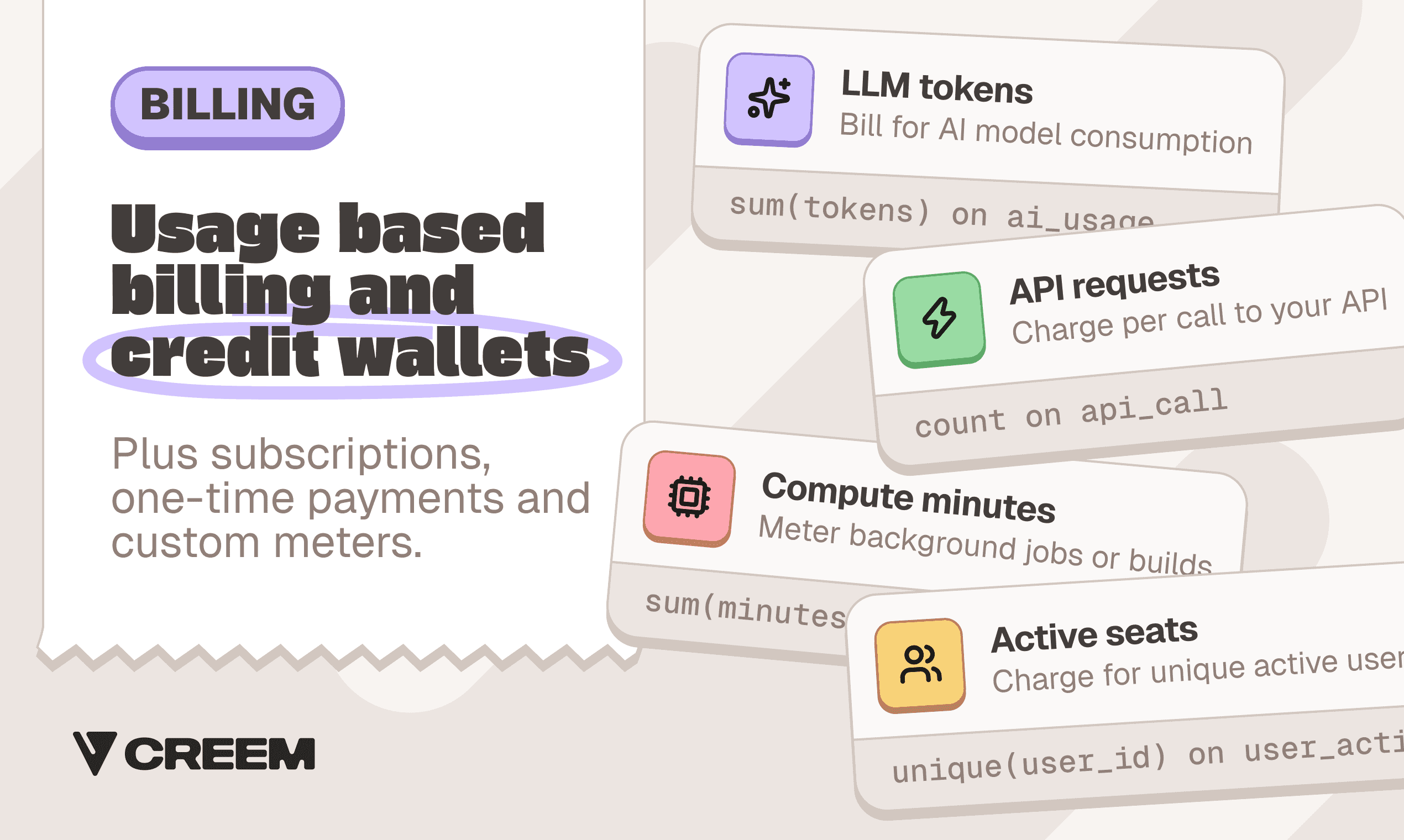
Example meters for LLM tokens, API requests, compute minutes, and active seats alongside subscriptions and one-time payments.
Ask the provider: “Can you meter my usage unit and run prepaid credits with auto-refill, or only recurring plans?” If it only supports recurring plans, your usage billing still needs a second system.
What you still handle yourself
Customer billing can move without moving product operations. Your responsibilities still include:
- Keeping the app available, access working, and purchases delivered.
- Making sure you have the right to sell what you sell.
- Answering support and refund requests.
- Verifying your identity or business at signup.
- Keeping your books and paying your applicable income or corporate taxes.
Payouts arrive with refunds and chargebacks deducted. Record those adjustments from the transaction reports in your own books. Those reports give you the records, and the bookkeeping itself stays yours.
Build your own billing stack or hand it off?
A lower processing rate saves money only if the saving exceeds what you spend running billing. Run last month’s sales through both fee models, then price your billing hours at what you would pay someone else to do the work.
| Cost | Run your own stack | Hand off to a merchant of record |
|---|---|---|
| Software and payments | Processing, billing, accounting, and tax tools | Transaction fees and optional services |
| Engineering | Connect and maintain the tools | Integrate and maintain the connection |
| Operations | Register for VAT where required, file returns, chase failed renewals, match payouts to invoices | Keep your books and support the product |
| Refunds and disputes | Absorb refunds and chargebacks, and fight disputes yourself | Fraud screening and chargeback handling sit with the merchant of record |
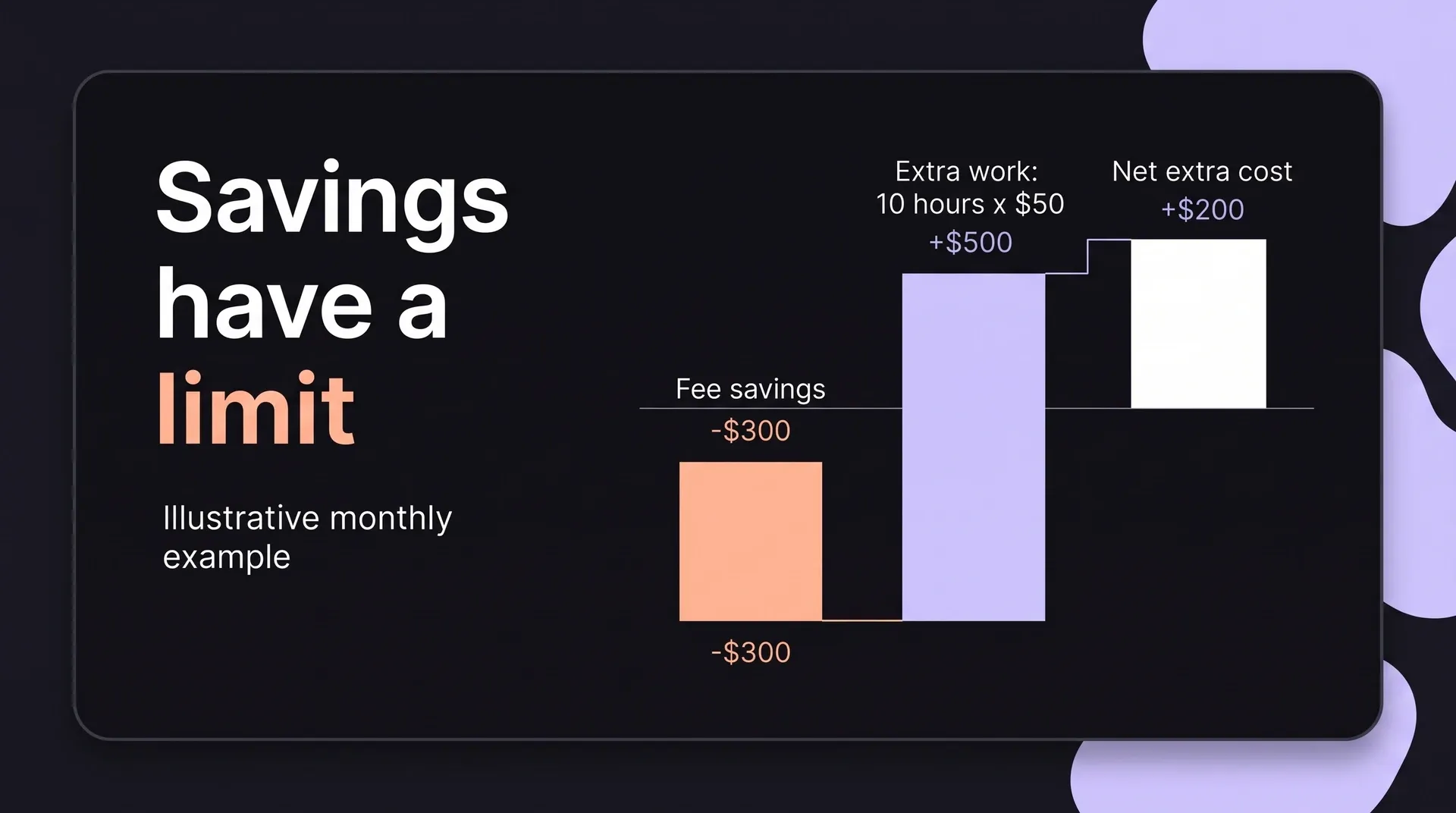
If your own stack saves $300 monthly in fees, but a VAT return and failed-payment emails take 10 extra hours valued at $50 each, that work costs $500. The lower-fee option costs $200 more overall.
For an illustrative $1 fixed fee, a $10 credit pack loses 10% before percentage fees, while a $100 plan loses 1%. Low-price, high-count products need a fixed-fee comparison first.
Stop billing and start shipping with Creem
Invoicing and accounting tools make you a faster biller. If you sell software or digital products to buyers in many countries, the bigger change is no longer being the seller on those sales, because the customer invoice and the transaction tax on each one then sit with the merchant of record while delivery and bookkeeping stay with you.
With Creem as the merchant of record, our name goes on the buyer's invoice as seller. Taking the seller role off your desk is what lets renewal invoices and tax filings run without you. A faster chore and no chore are different outcomes, and only the handoff gives you the second.
Try Creem, add your first product once verification clears and share its checkout. The renewal invoice and the VAT return that follow are then off your list, and those hours go into building.
FAQ
What is invoice automation?
Invoice automation is software that creates, sends, tracks and matches invoices to payments from rules you set once, instead of a person rebuilding each invoice by hand. Many tools also collect payment and retry failed charges.
Does invoice automation handle sales tax and VAT?
Some tools add the tax line to the invoice, but that does not register you, file the return or pay the tax over. You remain the seller of record. A merchant of record takes on that obligation for the sales it makes for you.
What is the best invoice automation tool for SaaS?
Stripe Invoicing is the common choice for startups running their own billing on Stripe. For subscriptions, usage or credits sold to buyers worldwide, a merchant of record like Creem handles invoicing along with tax and compliance, which usually fits software sellers better.
How is a merchant of record different from invoice automation software?
Invoice automation helps you send invoices faster. A merchant of record becomes the seller, issues the buyer’s invoice and takes on billing, failed-payment recovery, tax and compliance on those sales.